Built for residential general contractors
Know what a job is making while you can still change it.
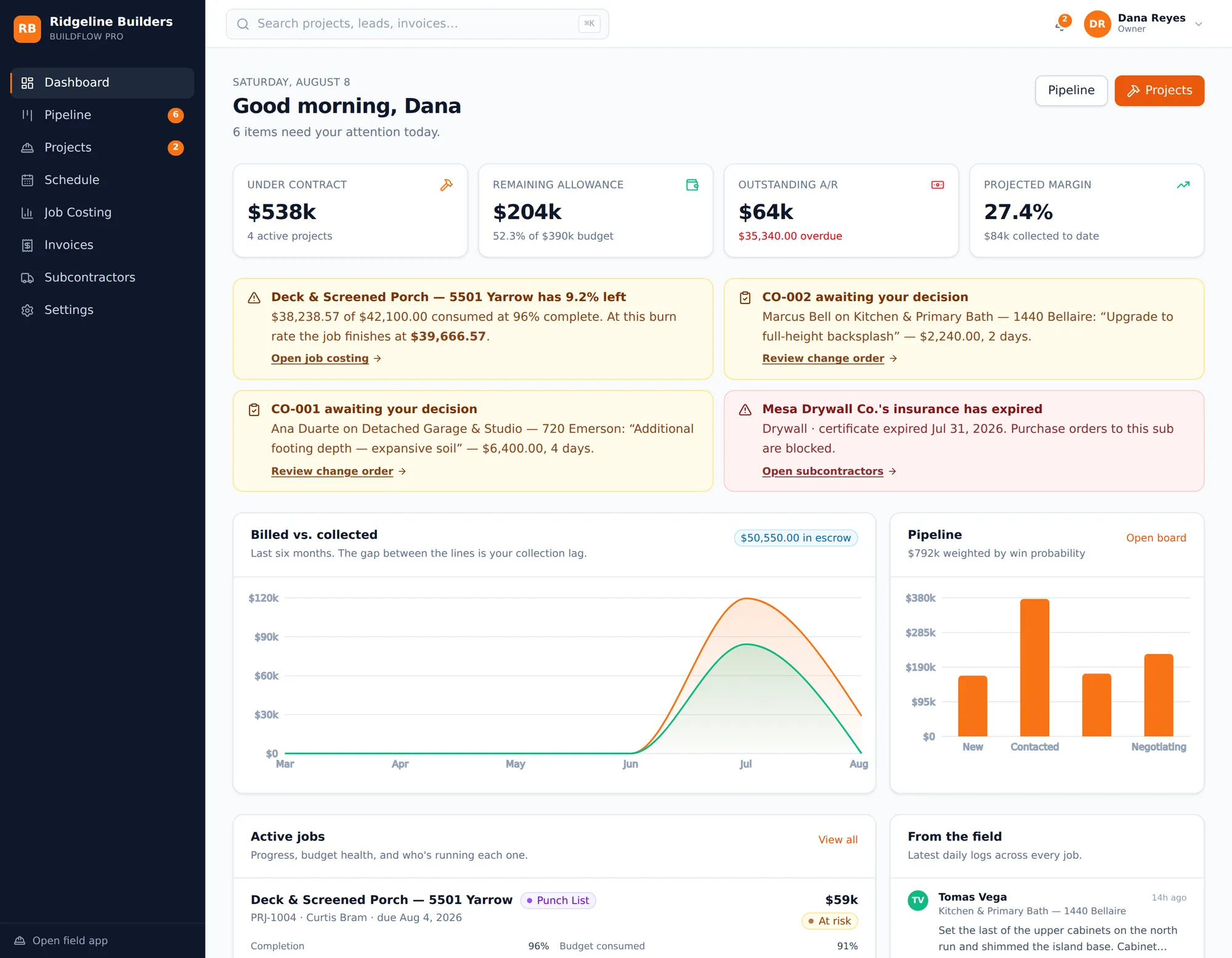
Most contractors find out a job lost money at closeout. ContractorProIQ runs the whole thing — lead, estimate, contract, schedule, field logs, costs, invoices — in one place, and every expense lands against a project and a cost code the moment it happens. Your margin is a live number, not a post-mortem.
Real data, no signup — brian@onestoproofingatl.com / contractorproiq
The problem
The job is run in six places that don't talk to each other.
None of these tools is wrong on its own. The damage is in the gaps between them — and the gap you pay for is the one between what a job costs and when you find out.
The estimate lives in a spreadsheet
Priced once, then never compared to what actually got spent. Nobody can tell you whether your labor rate was right, because the estimate and the costs never meet.
The job lives in text messages
Change orders get agreed in a thread and forgotten by billing. Delays get relayed by phone. When a homeowner disputes scope six weeks later, there's nothing to point at.
The money lives in QuickBooks — next month
Receipts get coded when the bookkeeper gets to them. By the time a job is reconciled, it's finished. You learn you lost four points on a kitchen in March, in June.
The cost of the gap is not the software you're missing. It's the four jobs a year that quietly go underwater while the numbers you'd need to catch it are still sitting in a shoebox and a group chat.
How we solve it
One record, from the first phone call to the final retention payment.
Not six integrated tools — one chain where each step hands the next everything it needs. The estimate you priced becomes the budget you're measured against, without anyone retyping it.
- 01
Lead
Captured from your site
- 02
Estimate
Priced off your catalog
- 03
Contract
Signed and locked
- 04
Budget
Seeded at cost basis
- 05
Field
Logs, photos, hours
- 06
Invoice
Billed by milestone
Signing the contract does six things at once.
The moment a homeowner signs, ContractorProIQ locks the contract, creates the project, seeds the budget from your estimate at cost basis rather than sell price, builds the schedule with its dependencies, opens the client portal, and files the signature with its audit trail. In one transaction — so it either all happened or none of it did.
That one detail — budgeting at cost, not at the price you sold — is the difference between a budget that tells you the truth and one that tells you what you hoped.
What you get
Everything the job touches, in one place.
Win the work
Leads that don't go cold
A capture form for your site, and a pipeline board where moving a card out of New stamps the time you first made contact.
Estimates off your own numbers
Line items from your cost catalog, markup per line, and live gross margin measured against your target as you build.
Alternates get priced without being counted in the total, so an option never silently inflates the contract.
Proposals and signatures
A branded PDF proposal, then embedded signing with consent text, timestamp, and IP in an append-only trail. The contract locks on signature.
The client never sees your cost basis or markup — only scope at sell price.
Run the job
A schedule that cascades
Finish-to-start dependencies with a real critical path. When one task slips, everything downstream moves with it.
Field logs from a phone
Up to twenty geotagged photos a day, weather, delays, and hours. The legal record of what happened, filed the day it happened.
Works offline — entries queue on the device and sync when signal returns, without duplicating on replay.
Change orders that get billed
Approval moves the contract value, the budget, and the schedule together, then notifies the homeowner.
Crew can raise one but never price it — pricing and approval stay with the PM.
A portal that stops the calls
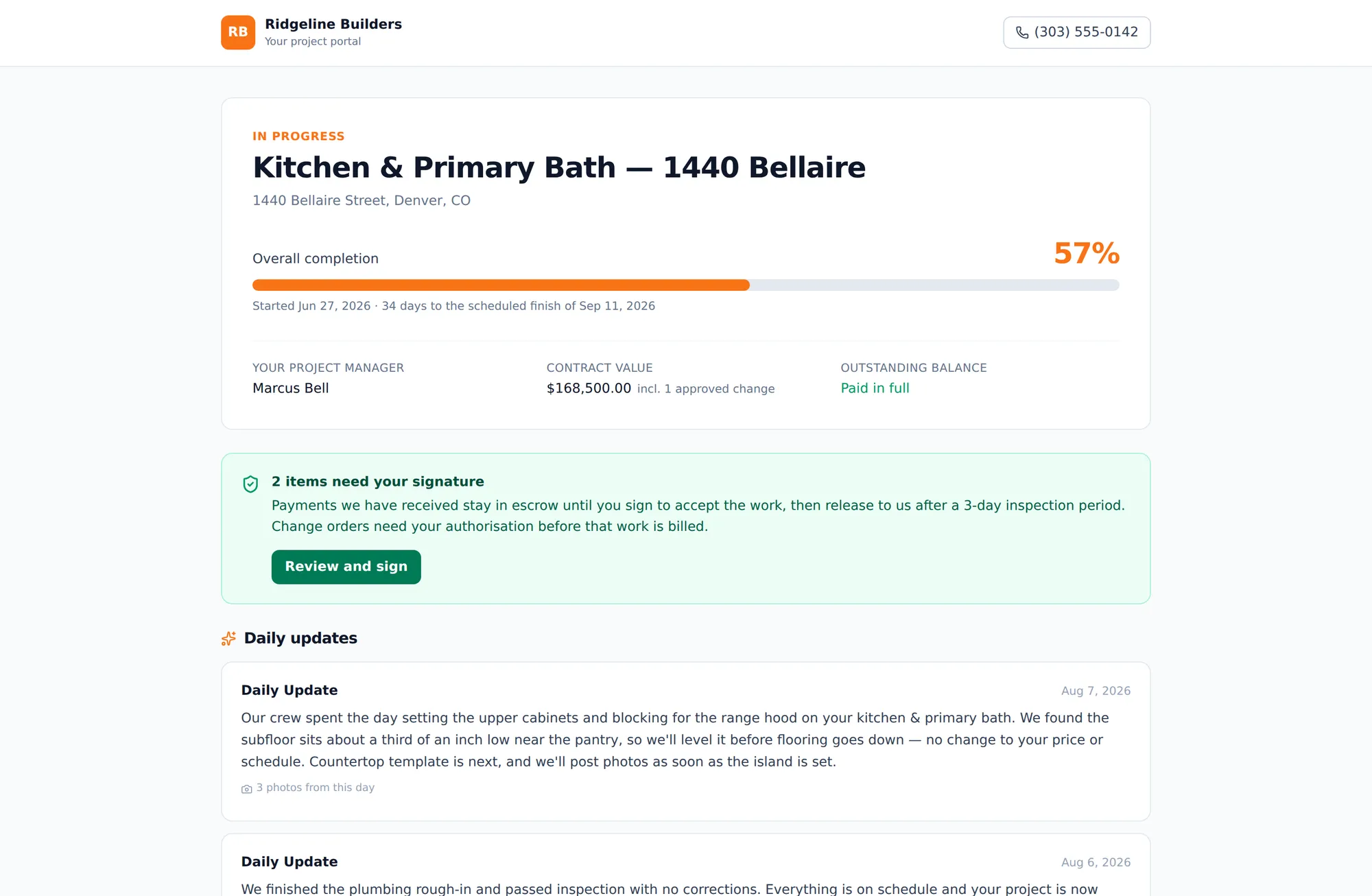
Your client sees progress, photos, approved changes, and invoices at a link — no account to create, nothing of yours exposed.
Control the money
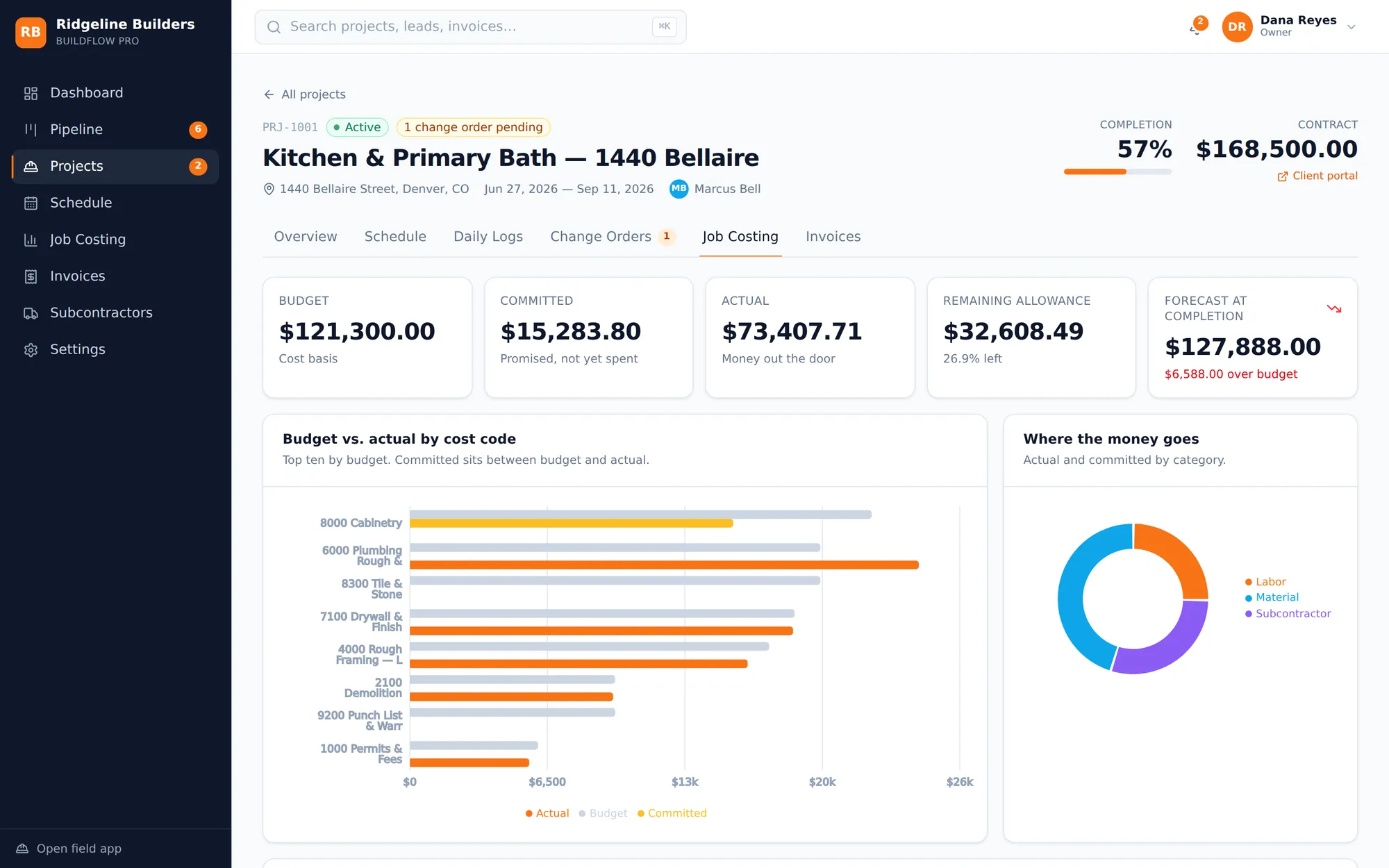
Live job costing
Every expense carries a project and a cost code. Enforced in the system, not just asked for on a form.
36 NAHB-standard cost codes ship pre-seeded — you can start without building a chart of accounts first.
Subs who stay insured
A lapsed certificate blocks new purchase orders outright. Not a warning banner — the PO does not issue.
Progress invoicing
Hitting a milestone raises the invoice. The client pays by card; funds hold until they approve and the inspection window closes.
Milestones bill the delta against what has already gone out, so completing two at once can never double-bill.
QuickBooks, both ways
Invoices push, expenses pull. When it isn't connected it reports honestly rather than inventing a reference.
AI & automation
AI writes the explanation. It never moves the date.
Every schedule change, cost figure, and billing number is computed by deterministic code that we test. The model's job is to read that result and tell you what it means — which is the part it's actually good at.
- A 5:00 PM client update, written from the day's field logs and posted to the portal
- A schedule optimizer reading weather, crew coverage, and supplier lead times — previewed before anything moves
- Lead scoring with win probability, the risk factors behind it, and a ranked set of next actions
- Insurance expiry, budget burn-down, and overdue invoices swept automatically
Schedule optimizer — sample output
“Cabinetry shifted 5 work days: the semi-custom package from Kitchen Craft Supply is not on site until Aug 17. Three downstream tasks moved with it to keep the sequence intact. Completion slips by up to 5 work days — confirm the new dates with the trim carpenter and notify the homeowner before it shows on their portal.”
The five-day figure, the three downstream tasks, and every new date came from the scheduling engine. The model was handed that result and asked to explain it. It cannot invent a date, because it is never the thing that sets one.
Built to be trusted with the money
Controls that hold when someone leans on them.
This is the system that holds your contracts, your signatures, and your clients' deposits. The guardrails are enforced in the data layer, not drawn on a settings page.
- Role-based access enforced on every query, not just hidden in the interface
- Crew accounts see no dollar figures anywhere in the product
- Two-factor authentication with standard authenticator apps
- Signed contracts lock — the audit trail records who, when, and from where
- Client deposits hold in escrow until the work is approved and the window closes
1
System, not six
Lead through retention
36
NAHB cost codes
Pre-seeded, editable
20
Photos per daily log
Geotagged, offline-capable
3 days
Escrow inspection hold
Configurable per org
Look at a real job, not a sales deck.
The demo is loaded with a working contractor's data — four live projects, real cost codes, a signed contract, field logs, and invoices in flight. Sign in as the owner, a project manager, a crew member, or a homeowner and see the same job from each side.
Password for every demo account is contractorproiq. No card, no signup.